


Superscript Symbols
Copy and paste Unicode superscripts for exponents, references, and compact formatting in text and documents
No results found
Try another name, a symbol, or a Unicode value.
How to Copy and Paste Superscript Symbols
Browse the superscript symbol grid to find the character you need. Select a superscript symbol to add it to the editor, then copy it and paste into your document, message, or any application that supports Unicode text.
Superscript symbols are Unicode text characters that appear raised above the baseline and are commonly used for exponents and reference marks.
Superscript symbols are Unicode characters that appear above the normal text line. Copy raised digits and operators for powers such as x², reference markers such as note¹, or charges such as Na⁺. These examples are text notation, not emoji.
What Are Superscript Symbols?
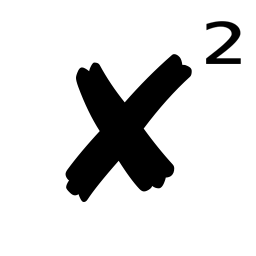
A superscript symbol is a Unicode character formatted as a raised version of a letter, number, or operator. Superscripts are commonly used to indicate exponentiation (such as X²), citation and footnote markers, and compact scientific or technical notation where space is limited. Availability varies by character; digits and a few operators are widely supported, while some letters may not have direct superscript equivalents.
Unicode Superscripts or Superscript Formatting?
A copied ² is a separate Unicode character. A normal 2 raised with a word processor's superscript command is formatting applied to ordinary text. Unicode offers digits and selected letters and operators, not every possible raised expression. Use an equation editor or superscript formatting for arbitrary text, and check plain-text exports because the formatting may be lost.
Popular Superscript Symbols
These superscript characters are among the most frequently copied because they cover common exponent and notation needs in everyday writing, math, and documentation.
| Symbol | Name |
|---|---|
| ² | Superscript Two (often used for “squared”) |
| ³ | Superscript Three (often used for “cubed”) |
| ¹ | Superscript One (commonly used for references and footnotes) |
| ⁰ | Superscript Zero (used in powers and indices) |
| ⁺ | Superscript Plus (used in charges and compact math) |
| ⁻ | Superscript Minus (used in negative powers and notation) |
Superscript Symbol Categories
Superscript characters can be grouped by how they are typically used. These groupings help you choose the right superscript for exponents, references, and compact technical writing.
Superscript Digits
Raised digits are commonly used to write powers (exponents) and compact indices in plain text.
⁰ ¹ ² ³ ⁴ ⁵ ⁶ ⁷ ⁸ ⁹
Superscript Operators
Operator superscripts are often used in compact math expressions, charges, and sign notation.
⁺ ⁻ ⁼
Superscript Parentheses
Raised parentheses can be used to keep small superscript expressions visually grouped when space is limited.
⁽ ⁾
Exponent-Style Writing
These are common combinations people form by mixing base text with superscript digits to show powers.
X² X³ 10⁶
Footnote and Reference Markers
Superscript digits are frequently used as simple reference markers in text when a dedicated footnote format is not available.
Example¹ Example²
Science and Engineering Notation
Superscripts can be used to represent powers of ten and other compact notations in technical writing.
10⁻³ 10⁶
Decorative Raised Text
Raised digits can decorate short labels, but they remain superscript text characters rather than emoji.
Level² ¹²³
Superscript Symbol Usage Examples
Superscript symbols appear in many practical contexts, from simple math to technical notes. These examples show how superscripts are commonly placed inline with normal text.
Math / Exponent
Area can be written as m² in compact form
Science Notation
A small value may be written as 10⁻³
Footnote Marker
Please review the policy¹ before submitting
Chemistry / Charge Notation
An ion charge can be written with a superscript like Na⁺
Documentation / Version Tag
A short label may use superscripts for clarity, such as v2¹
Professional and Practical Uses for Superscript Symbols
- Writing exponents in plain text (e.g., squared and cubed notation)
- Adding footnote-style reference markers in documents and notes
- Scientific and engineering notation such as powers of ten
- Technical documentation where compact inline formatting is preferred
- Typing superscripts in word-processing contexts when supported
How to Type Superscript Symbols on Any Device
- Choose a superscript character from the grid (for example ², ³, or ⁻) and add it to the editor.
- Copy the selected superscript symbols using the copy button or CTRL+C (Windows/Linux) or ⌘+C (Mac).
- Paste the symbols into your app using paste or CTRL+V (Windows/Linux) or ⌘+V (Mac).
Unicode Superscript Symbols and Meanings
Superscript symbols are defined by the Unicode standard, which provides a code point and official character name for each supported superscript digit or operator. This helps superscripts remain portable across systems, but exact rendering can vary depending on fonts and software, so they are typically used for lightweight formatting rather than strict typesetting.
Superscript Symbols List and Meanings
Use this reference table to review common superscript characters and how they are typically used in text. Select a symbol to copy it or to view its Unicode name for documentation and compatibility checks.
Load Full Unicode List of Superscript Symbols
| Symbol | Name | Unicode |
|---|---|---|
| ⁰ | Superscript Zero | U+2070 |
| ¹ | Superscript One | U+00B9 |
| ² | Superscript Two | U+00B2 |
| ³ | Superscript Three | U+00B3 |
| ⁴ | Superscript Four | U+2074 |
| ⁵ | Superscript Five | U+2075 |
| ⁶ | Superscript Six | U+2076 |
| ⁷ | Superscript Seven | U+2077 |
| ⁸ | Superscript Eight | U+2078 |
| ⁹ | Superscript Nine | U+2079 |
| ⁺ | Superscript Plus Sign | U+207A |
| ⁻ | Superscript Minus | U+207B |
| ⁼ | Superscript Equals Sign | U+207C |
| ⁽ | Superscript Left Parenthesis | U+207D |
| ⁾ | Superscript Right Parenthesis | U+207E |
Put symbols together before you share them
Browse Unicode symbols, combine them with your own words in the collector, and copy text or download a styled PNG.

 QUICK TUTORIALHow to copy symbols?Build a message with arrows and symbols. Select arrows, then add words in the collector.English narration · English captions · 17 secondsWatch tutorial
Find the right character
Browse a category or search by name, a character or a Unicode value.
Choose between browsing and search
A category narrows the collection to a useful subject. Search can find a character by a familiar word such as arrow, by the character itself, or by a Unicode value such as U+2605.
Open Info where available to see the character name and code values. A Unicode code point identifies a character; it is not necessarily a keyboard shortcut. The X action opens a composer with your selected text for you to review.
Build a line before you copy
Collect several characters in the editor at the top, then copy the finished text.
Use the collector and its editing controls
Select a character to insert it at the cursor in the collector. Type ordinary text alongside it, select a range to replace it, or press Enter for another line. Undo reverses the last change; Clear removes the collected text.
The direction control changes the writing direction. Copy sends the actual text to your clipboard; paste it into the destination app and check how its font displays the characters.
Keep useful characters nearby
The star saves a favorite in this browser without an account.
Find and remove your favorites
Use the star on a card to save it. Open Favorite and choose the appropriate collection to find it again; selecting a filled star removes that item. Saved items are separate from the text in the collector.
Favorites and drafts belong to this browser profile. Clearing site data or switching devices can remove or hide them. Copy any important text somewhere you can keep it before clearing browser storage.
Choose editable text or a finished image
Copy keeps characters as text. Make image turns the chosen content into a PNG.
Style the PNG before downloading
Use Make image on a card for that item, or in the collector toolbar for your assembled text. Choose a font, text size and colors; enable Transparent background if you need the image to sit over another design.
The compact image creator accepts up to 2,000 text units and 50 lines. Very wide or large output can still exceed its canvas limit; reduce the size, shorten the lines or use fewer words if the preview reports that problem. Download PNG preserves the rendered appearance, but the resulting lettering is no longer editable as text.
Inputs, results and privacy
The collector and PNG creation run in your browser. Pages, search results, fonts and public artwork still load from the website. Copying may require a browser permission or a manual copy action.
Favorites and the collected draft are stored locally when browser storage is available.
Using Superscript Symbols on Social Media and Online Platforms
Superscript symbols are often used to add compact details to text, such as small reference markers, stylized numbers, or exponent-like formatting in profiles and posts. Because these are Unicode characters, you can usually copy and paste superscripts into bios, captions, comments, and messages; however, appearance can vary by font, device, and platform, and some apps may render certain superscripts differently.